DIYAutoTune.com
Welcome Guest! Would you like to log yourself in? Or would you prefer to create an account?

Search
 
Specials more
DIYBOB Breakout Adapter - JAE 88 pin
$89.00
Categories
DIYPNP
MegaSquirtPNP
MegaSquirt I Kits
MegaSquirt II Kits
MegaSquirt III
MegaSquirt 'Mod-Kits'
MegaSquirt Complete
MS Display Devices
GPIO Board
MS Adapter Boards
DIYBOB
Wiring Components
Weather Pack Kits
Fuel Delivery
Sensors
Trigger Wheels
Idle Air Control
Ignition Components
Boost Control
MicroSquirt
eMS-Pro ECU
WideBand o2 Systems
EGT Measurement
Datalogging Systems
B & G CPUs and PCBs
Cases & Endplates
Tuning Cables
Tools
T-Shirts - Decals - Etc
MS Service Parts
Gift Certificates
Package Deals
Securely Accepted
DIYAutotune.com securely accepts Visa, Mastercard, American Express and Discover with 128bit Extended Validation SSL encryption for your protection!
DIYAutotune.com also accepts Paypal for your convenience!

Tell your friends about this page!

Add to browser favoritesAdd to Twitter Add to StumbleUpon Add to Squidoo Add to MySpace Add to Google Bookmarks Add to Facebook Add to Digg Add to Del.icio.us

PCBv3 -- PWM IAC Valve Control (TIP120) 'Mod-Kit'

 [mk-PWMIAC]
 $7.50 
  Add to Wish List  
Quantity:     

Description

PCBv3 -- PWM IAC Valve Control (TIP120) 'Mod-Kit'

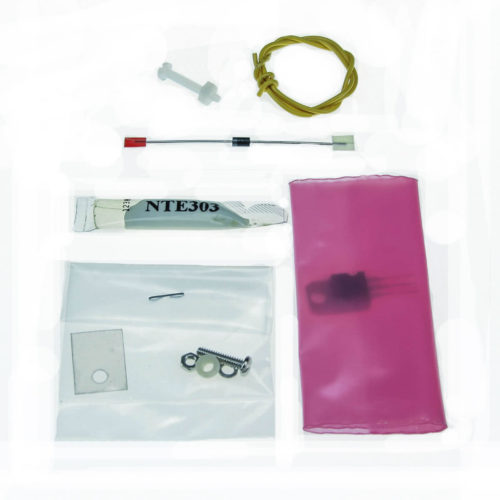
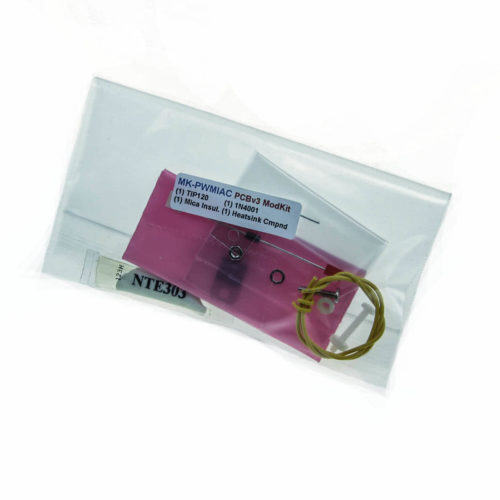
These are the parts needed for the 'TIP120 PWM IAC' mod as described in the blue box after step 62 of the MS v3 Assembly Guide. This mod supercedes the previous 'mk-FordIAC' as it's more robust since it allows you to heatsink the transistor. If you are installing all optional components on the v3 heatsink (leaving no extra space for this transistor there) then you can drill a hole in your case and use it as your heatsink.


This kit will work with both the V2.2 and V3.0 PCBs. (Not needed on PCB 3.57 SMT ECUs)


V3.0 Installation

From the blue box after step 62 of the MS v3 Assembly Guide:

DO NOT install Q4 for use with PWM idle valves - it cannot handle the current directly for PWM idle valves. ('On/Off' type idle valves used with a relay are fine with the default Q4.)

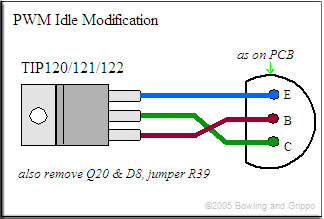
Instead, for a PWM idle valve, use a TIP120/121/122 transistor (included in this kit) mounted on either the heat sink (if you have a spare spot) or the case. You should use a mica insulator with heat sink grease (both also included) as well. Run wires to the Q4 connections as shown below:

TIP12x on a PCB3.0

Do not install Q20 or D8, and jumper R39 as well. You will also have to put a 1N4001 diode (included) across the PWM Idle valve itself - the banded end goes to the 12 Volt supply, the non-banded end goes to the lead that goes to MegaSquirt (this diode is for flyback purposes on the idle valve).


V2.2 Installation


Replace transistor Q5 with the TIP120/121/122 transistor. You should mount the transistor to the case using the included mica insulator and heat sink grease. Wire it to the board as shown:
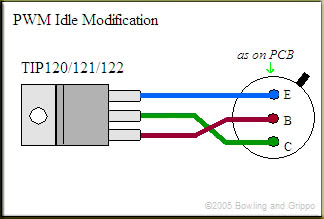
TIP12x on a PCB2.2

You do not need any further modifications to the board or external wiring when installing this with a V2.2 board. (Ignore the line about Q20, D8 and R39 in the image above, that applies to V3.0 boards only)


Wiring and Configuration

To wire this up without the relay board (directly to the ECU), wire up the hot wire from the idle valve to switched 12v+, and wire the negative wire from the idle valve directly to pin 30 on the MegaSquirt DB37.


To wire this up with the relay board, you will need to jumper the FIDLE relay to take it out of the loop; below is a picture of how to do this. Then you will still wire up the hot wire from the idle valve to switched 12v+ (you could use the fuel pump power from the relay board), and wire the negative wire from the idle valve directly to the FIDLE terminal on the relay board. This will allow full control of your PWM idle valve.
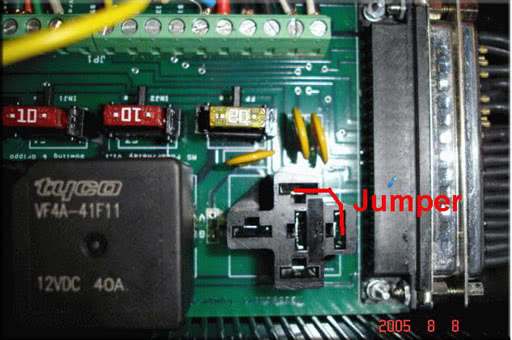
How to jumper the FIDLE output on the Relay Board

Image 'borrowed' from the MSnS-E pages


Configuration with the MS-I and MSNS-E firmware
For tuning the PWM Idle using the MSnS-E firmware the information is located in the MS1/Extra Manual on the Idle Valves page.


Configuration with the MS-II
For usage with the MS-II you first use the MegaTune Configurator, and open CAR1>SETTINGS.INI>SETTINGS>IDLE_CONTROLLER and select PWM_GAUGE from the dropdown box at the top right.

Then save and exit the Configurator.

Open MegaTune and connect to the ECU, and from the SETTINGS menu choose IDLE CONTROL. Select the PWM Warmup ‘Algorithm’ and then you can configure the values for your vehicle and click ‘Burn to ECU’.

More information on tuning these settings can be found here: http://www.megamanual.com/megatune.htm#sd


More Info

Mfg Info

DIYAutoTune.com

Manufacturer Info
DIYAutoTune.com Homepage
Other products

Extra Info

Product Reviews
There are currently no product reviews
Write a review on this product!


Extra Info
This product was added to our catalog on Thursday 24 August, 2006.Notify me of updates to PCBv3 -- PWM IAC Valve Control (TIP120) 'Mod-Kit'
Tell someone you know about this product.
  Add to Wish List  
Quantity:     
Customers who bought this product also purchased
 
Shopping Cart more
0 items
Product Reviews more
Write ReviewWrite a review on this product!
Information
Shipping and Returns
Privacy Policy
Conditions of Use
Gift Voucher FAQ
Contact Us