MegaSquirt works with many popular 3rd party dash devices & loggersLast updated 8/24/22 DIYAutoTune Related Products:
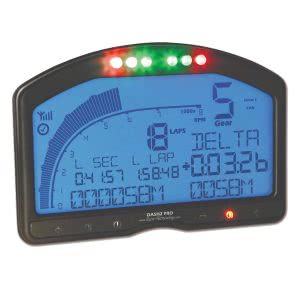
There’s no shortage of drop-in digital dashes, data logging units, and other displays on the market for race cars that are designed to get their data from the engine management system. A growing number of them support MegaSquirt. Here, we present a roundup of units known to work with the MegaSquirt, as well as various smart phone and tablet apps that provide a similar function. If you know of one that works with MegaSquirt that we didn’t list, send us an email and we’ll get it added. If you are a programmer looking for the information needed to add MegaSquirt support to your data logging system, you’ll also find it here. All the entries are in alphabetical order. Data loggers and dashboardsAEM ElectronicsCD-5 Carbon Digital Racing Dash AEM’s CD series racing dashes connect to the MS2 and MS3 over the CAN bus as long as you are running the latest firmware on the ECU. AEM has a predefined setting which they have tested in house on MegaSquirt hardware to make setting this up straightforward. The only extra parts needed would be a 2 pin DTM style connector for the dash’s CAN bus wiring. AiM SportsAiMSports.com AiM’s popular MXL and MyChron devices now support MS1, MS2, and MS3 if you are running the latest firmware and Race Studio version. MS1 connects over serial, while MS2 and MS3 use CANBus. You do not need any specific hardware – just connect the wiring harness provided by AiM Sports to the appropriate points on the MS. Auto MeterAuto Meter LCD Competition Dash Auto Meter’s LCD Competition Dash supports CAN input for use with an MS2 or MS3. Currently they do not have a preconfigured definition file, but the software is very flexible in setting up definition files. Autosport Labswww.autosportlabs.com Autosport Labs offers the Podium Connect and RaceCapture data logging and telemetry systems. These connect to MS2 and MS3 over the CAN bus. Autosport Labs offers several models with various data acquisition and cell phone based telemetry capabilities. They also have an Android display app which connects to their own hardware. Banks PowerBanks Power iDash 1.8 DataMonster The iDash fits in a 52 mm gauge pod, connects over CAN, and can display up to eight separate readings. Up to four units can be daisy chained together. Supports MS2 and MS3 ECUs. This uses the CAN broadcasting protocol and requires MS2/Extra 3.4.0 or later, or MS3 1.4.0 or later firmware. Dakota DigitalDakota Digital MegaSquirt Interface Module Dakota Digital’s VFD3 Rev G, VHX, and HDX dash systems can read CAN data from devices in the MS2 and MS3 family using a Bridge Interface Module. Requires MS2/Extra 3.4.0 or later, or MS3 1.4.0 or later firmware. Perfect Tuningwww.perfecttuning.net Perfect Tuning makes a display that fits in a 52 mm gauge hole and can display up to eight channels. This unit can connect to the MS2 and MS3 over CAN. Works with all standard firmware variants. In addition, the gauge can monitor up to three analog sensors on its own and transmit the data back to an MS3. Requires MS2/Extra 3.4.0 or later, or MS3 1.4.0 or later firmware. We carry the Perfect Tuning universal gauge: Racepakwww.racepak.com MS2 (firmware 3.4.x and newer) and MS3 (firmware 1.4.x and newer) are compatible with Racepak VNet via the RACEPAK-CAN interface module, or on some newer models It uses the simplified dash broadcasting mode — section 1 of this pdf shows what fields are transmitted and how to set up the MegaSquirt to broadcast the data: http://www.msextra.com/doc/pdf/Megasquirt_CAN_Broadcast.pdf We carry the following RacePak items: Race Technologywww.race-technology.com Race Technology dashes use the CANBus wires to connect to MS3 and MS2. Works with MS2/Extra 3.3.2 and higher, and MS3 1.3.1 and higher release codes. You will need to get the CAN bus option from Race Technology. If ordered from us, it will come with this option standard. We carry the Race Technology Dash2Pro.
Smartphone and Tablet AppsmobiSQUIRT (iOS)www.mobisquirt.org mobiSQUIRT is available for the iPhone and iPad. Current versions support MS1 and MS2, with MS3 support planned. Connecting to MegaSquirt requires a serial to WiFi adapter. MSDroid (Android)Note: Customers have reported this app may no longer be supported by its development team. MSDroid.com MSDroid is a display, logging, and tuning program that supports MS1, MS2, and MS3. Can use Bluetooth or USB. MSLogger (Android)MSLogger is now merged with MSDroid, above. RealDash (Android, iOS, Windows 10)realdash.net RealDash is a display and data logging app that can run on several platforms. The Android version can connect using a Bluetooth or WiFi adapter, while the iPhone / iPad version is WiFi only. Shadow Dash (Android)The latest smartphone program from Phil Tobin at EFI Analytics. As the name implies, this permits using a phone or tablet as a dash display. This one has a TunerStudio-style dash display, data logging, and can also load and save tunes, so you can carry around tunes for different fuels or different setups in your phone without using a laptop. Connects over USB or Bluetooth. Shadow Logger (Android)Shadow Logger is an Android logging program from Phil Tobin, the same programmer who brought you TunerStudio and MegaLogViewer. It supports MS1, MS2, and MS3. Connecting to MegaSquirt requires a serial to Bluetooth adapter. Note that Phil also has a newer program out, Shadow Dash (above). Developer informationMS1 has just one communication method available, an RS232 port. Click here for MS1/Extra serial documentation. MS2 (including the MicroSquirt, DIYPNP, and MSPNP Gen 2) supports both RS232 communication and CANBus. There are two CAN modes available:
The 11 bit CAN broadcasting protocol is also available in a DBC file, for devices that use this for interface development. Current laptop tuning software uses RS232 exclusively, so a CAN based display device would be able to keep running with a laptop connected, while an RS232 based one would not. MS3 is very similar to MS2, and uses the same RS232 protocol as the current MS2/Extra. Like MS2, it also uses CANBus, using the Extra protocols. |